The Arcade · Game Hub Launcher
- 4.5
- Rating
- 1.00M
- Installs
- Free
- Price

 Analysis by App-foxy
Some Android apps try to make a phone feel more personal by changing icons or backgrounds. The Arcade · Game Hub Launcher takes a different route: it turns the starting point of the device into a gaming-themed space. I found that idea more useful than I expected, especially when I wanted my games to feel like a separate part of my phone rather than a scattered row of icons.
It is a free personalization app from Rollerbush, aimed at people who want their Android home experience to have an arcade flavor. The store summary calls it “your personal gaming space,” but the important question is whether that space actually improves daily use. My answer is yes, with qualifications. It works best for someone who enjoys a focused game collection and likes visual atmosphere; it is less convincing for anyone who wants a full replacement for a conventional launcher or a completely self-contained gaming platform.
How the launcher changes the way I reach games
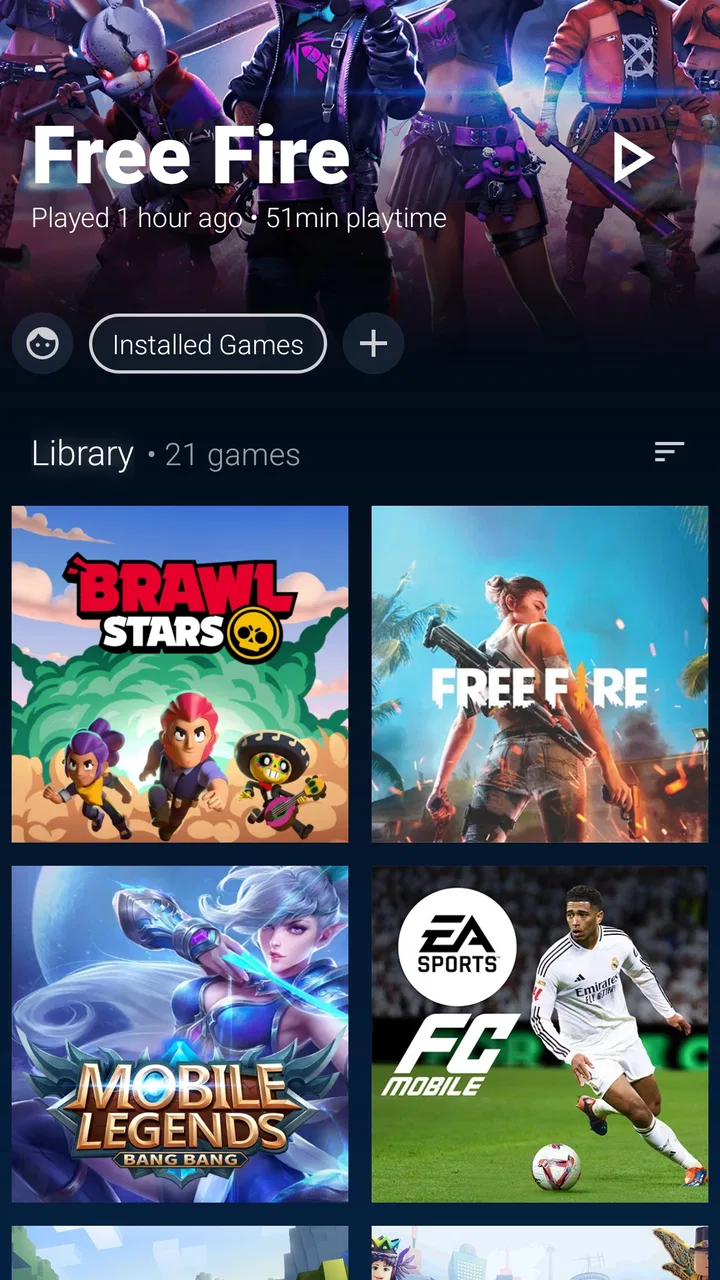
The first thing I noticed is that the appeal is not simply having another shortcut. The app changes the mood of opening the phone. Instead of treating games as ordinary apps among messaging, banking, and work tools, it gives them their own destination. That small separation can make a phone feel less cluttered and can also reduce the time I spend hunting through several home-screen pages.
You May Also Like

 Blood Strike: 2.5 Anniversary
Blood Strike’s Loadouts Turn Every Drop Into a Tactical Gamble
A close look at Blood Strike’s custom loadouts: how fast access to signature weapons reshapes its battle royale rhythm, rewards preparation, and narrows the gap between fights.

 Pandora - Music & Podcasts
Pandora’s Music Is Easy to Start, but Harder to Recover
Pandora’s strength is its low-effort path from a seed to a station. Its weak spot is how much confidence it asks you to place in connection, setup, and quiet recovery.

 8 Ball Pool
 Is Built on Rivalries, Rematches, and Routine
A close look at the rivalries, rematches, shared routines, and unanswered safety questions that turn a quick pool match into a persistent mobile community.

 Samsung Music
’s Quiet Strength Is Playing What You Already Own
Its reach comes less from spectacle than from dependable access to a personal library. That simplicity is both the app’s strongest retention engine and its ceiling.

 AccuWeather: Weather Radar
AccuWeather Review: A Quick, Clear Forecast for Everyday Decisions
For everyday plans, the best forecast is the one you can understand quickly. AccuWeather makes rain timing, radar, and local conditions easy to act on, with a few trade-offs.

 Hill Climb Racing
Why Hill Climb Racing Still Turns Crashes Into One More Run
A tiny car, a bumpy hill and one more upgrade: Hill Climb Racing keeps resurfacing because its simple chaos makes every near-miss feel personal.
More From Our News Desk



As a personalization app, its value depends heavily on how much you care about the presentation of your device. If you already keep a tidy folder called “Games,” the practical difference may be modest. The Arcade is more interesting when you want that folder to feel like an intentional environment rather than a storage box. I would describe it as a themed front door for gaming, not as a new game store or a replacement for the games themselves.
That distinction matters before installing it. The app does not magically make every title launch faster, improve graphics, or turn a regular phone into dedicated hardware. Its contribution is organization and identity. I liked it most when I treated it as a gaming mode for the home screen: a place to enter when I had a few minutes to play, then leave when I needed the rest of my phone.
Rollerbush has kept the basic proposition easy to understand. The current version is 4.0.6, and the app is available at no charge, with optional in-app purchases priced at $1.99 per item. That makes it approachable for experimenting, although anyone who dislikes cosmetic purchases should pay attention to which parts of the experience are included and which may require spending.
Where connectivity becomes part of the experience
A launcher can look local and immediate, but the connected parts of using one deserve more attention than they usually get. The moment I move from the launcher into a game, the experience may depend on that game’s own connection needs. Online titles, account checks, advertisements, cloud saves, and updates can all affect what happens after the launcher has done its job.
This means The Arcade should not be judged as though it controls the entire network path. It organizes access, but it does not remove the ordinary online requirements of individual games. If I am on a weak connection, the launcher may still open while a selected title takes longer to authenticate or load. That separation is useful: it helps identify whether a problem belongs to the hub or to the game I chose.
There is also a practical difference between browsing a collection and actually playing. Looking for a title in a dedicated gaming space can be quick, but the next step may involve a download, an update, or a login. I found it helpful to think of the launcher as the reliable starting point, not a promise that every game will be ready immediately. That expectation prevents a lot of frustration.
For households or users with limited data, this is especially important. A polished gaming entrance can encourage spontaneous tapping, and spontaneous tapping can lead to downloads. I recommend checking the size and update behavior of a game before starting it on mobile data. The launcher itself may be light to use in the moment, but the content it leads to can be much more demanding.
Using it in real mobile situations
The best everyday scenario for me was a short break away from my desk. I opened the phone, entered the gaming space, and reached the game I had in mind without passing through work notifications or unrelated apps. That separation made the break feel more deliberate. It was not a dramatic productivity transformation, but it removed a few small distractions.
It also suits people who share a phone with many different kinds of apps. A student might want a clear boundary between study tools and games. A parent could prefer a recognizable gaming area instead of having children search through the full app drawer. Someone who plays only occasionally may appreciate a visual reminder of what is installed rather than forgetting titles behind several screens.
On the other hand, I would not automatically recommend it to a person who uses a minimalist home screen. If you prefer one clock, a few essential shortcuts, and as little visual activity as possible, an arcade-style launcher may feel like extra decoration. The same is true if you already use a highly customized launcher whose folders, gestures, and search tools are central to your routine. Adding another layer can create more switching than it saves.
It is also worth considering how you hold the phone and when you use it. A gaming hub is most useful when the screen is already your main route into games. If you usually launch titles from notifications, voice commands, a controller, or a dedicated gaming mode built into the phone, the benefit becomes narrower. The Arcade is strongest for direct touchscreen navigation, not for replacing every gaming workflow.
What happens when something fails
My main test for a hub like this is not the ideal launch. It is what happens when an icon leads to a title that has been removed, updated, signed out, or interrupted by a network problem. In those moments, the launcher can only provide the route. The actual recovery belongs to the game, Android, or the relevant online service.
That limitation is not a flaw unique to this app, but it changes how I would use it. I would avoid treating the hub as a diagnostic tool. If a game refuses to open, I would first check whether the game itself needs an update, whether the account is signed in, and whether the connection is working. Reopening the launcher repeatedly is unlikely to fix a failure that occurs after the handoff.
A useful habit is to keep one familiar route to important games outside the themed space, such as the standard app list. That gives me a fallback if the launcher is temporarily inconvenient or if I need to reach a title while troubleshooting. It also prevents the hub from becoming a single point of confusion when I am in a hurry.
Recovery is more straightforward when the problem is simply finding a title. A dedicated gaming area reduces the chance that a game is buried among utilities and social apps. But organization has a trade-off: if the hub’s presentation becomes the focus, I may spend time browsing rather than playing. For me, the best approach is to arrange the space around games I actually use and avoid keeping every forgotten download in view.
When a phone is low on storage, the launcher will not solve the underlying issue. A visually neat collection can still point toward large games that compete for space with photos, work files, and updates. I would use the hub as a reason to review the collection, not as an excuse to keep everything installed. Removing titles I no longer play makes the gaming area more useful and makes future network downloads easier to manage.
Keeping the experience friendly to limited data
Connectivity affects The Arcade in two ways: the app is a gateway to connected content, and the gaming habit it encourages can increase data use. I would set a simple rule for myself: browse freely on mobile data, but start large downloads and updates only when I am comfortable with the connection. That keeps the launcher convenient without allowing a quick break to become an unexpected data drain.
Another practical tip is to separate “ready now” games from “needs attention” games in my own routine. Titles that require an update or account step should not be the first choice when I have only a few minutes. The hub makes access more inviting, so knowing which games are dependable in a particular situation becomes more valuable than having the largest possible collection.
People who travel should think about this before relying on the app as their only gaming entrance. Network quality can change between home, public Wi-Fi, transit, and roaming service. A launcher may remain useful for finding installed games, but the play session can still be shaped by sign-in checks, downloads, or server availability. I would prepare the games I expect to use before leaving a stable connection and avoid assuming that a familiar icon guarantees immediate play.
Privacy and data-conscious use also include ordinary phone habits. I would review Android’s network controls and the settings of individual games rather than assuming that a launcher manages them all. This is one of the clearest boundaries of the product: it presents the gaming side of the phone, while the detailed behavior of each game remains separate.
How it compares with ordinary alternatives
The simplest alternative is a regular folder on the home screen. That option is faster to set up and usually consumes less attention. It wins if all I need is a compact list of titles. The Arcade wins when the emotional side of personalization matters—when I want opening the folder to feel like entering a dedicated space rather than checking a list.
A full custom launcher is another alternative. It may offer deeper control over gestures, grids, icons, search, and multiple home-screen behaviors. For a power user, that flexibility can be more important than a gaming theme. The Arcade is easier to understand because its purpose is narrower, but that narrowness also means it should not be chosen expecting the broadest Android customization toolkit.
Some phones include their own gaming dashboards or game modes. Those may be better when the priority is device performance controls, notifications, recording, or controller-related tools. The Arcade makes more sense when the priority is the entrance and organization of games. I see it as complementary in spirit, although I would avoid stacking several interfaces if they make launching feel slower or more confusing.
There is also the option of using no special layer at all. For people who play one or two games, the standard home screen is probably enough. The Arcade becomes worthwhile as the collection grows or when the owner wants a stronger visual identity for gaming. That is a personal threshold, not a technical requirement, and it is why I would encourage trying the free version before paying for any optional item.
Who will enjoy it, and who should skip it
I think it is a good fit for casual and regular Android players who want their games separated from everyday apps. It can also suit families, younger users, and anyone who enjoys themed personalization without needing to build a complete interface from scratch. The Everyone age rating makes it broadly approachable, though a parent should still consider the content and online behavior of the individual games placed inside it.
I would be more cautious recommending it to someone who expects one app to manage downloads, accounts, performance, and offline access for every game. That is not how I would frame its role. It is a hub and a visual layer. The moment a game opens, its own requirements take over, including any connection or update needs that apply to that title.
I would also skip it if my phone’s home screen is already carefully optimized and I rarely play games. In that situation, the extra identity may not justify another place to navigate. Likewise, users who depend on a manufacturer’s built-in gaming tools may get more practical value from staying inside that system.
The audience response suggests that the concept has found a real audience: it holds an average rating of 4.5 from around 6.7 thousand ratings, with more than a million installs. Those figures do not replace personal testing, but they do indicate that the gaming-space idea is not an obscure experiment. I can understand the appeal, especially for people who want their phone to reflect gaming as a hobby rather than treating it as an afterthought.
My connectivity verdict
After using it as a dedicated entry point, I see The Arcade · Game Hub Launcher as a focused personalization choice rather than an essential Android utility. Its strongest quality is the way it gives gaming a clear place on the phone. That helps during short breaks, reduces visual clutter, and makes a collection feel more intentional.
Its relationship with connectivity is more limited but also easier to understand. The app can organize the route to a game, while the game determines what happens next. Weak service, sign-in problems, updates, and download demands do not disappear because the launch point looks polished. Users who understand that boundary will get a smoother experience and will know where to troubleshoot when a session fails.
My practical recommendation is to install it if you want a gaming-first atmosphere and are happy to keep ordinary Android access available as a fallback. Try it with the games you genuinely play, watch your mobile data when starting unfamiliar titles, and avoid judging the hub by problems that belong to an individual game. The free entry makes that trial low-risk, while the $1.99 optional items deserve a little restraint if you are mainly looking for organization.
Overall, I would recommend it to a friend who says, “I want my phone to feel more like my gaming space.” I would not recommend it as a universal solution for network reliability, game management, or advanced launcher control. Within its narrower purpose, though, it has a clear personality and a useful everyday role. The best reason to use it is not that it changes how games run, but that it changes how naturally they fit into the way you use your phone.
FAQs for The Arcade · Game Hub Launcher
01What is The Arcade · Game Hub Launcher?
The Arcade · Game Hub Launcher is an Android-focused hub designed to organize and access games from one convenient interface. Instead of searching through the regular app drawer, users can browse their installed titles in a gaming-oriented environment. Depending on the device and version, it may also provide shortcuts, categories, or launcher-style tools that make returning to favorite games faster and more visually appealing.
02Does The Arcade · Game Hub Launcher include games, or does it only organize installed games?
The app is primarily intended to act as a game hub or launcher rather than a complete catalog of downloadable games. In practical use, its main purpose is to bring your existing games together and make them easier to find and launch. Users should not assume that every title shown inside the interface is included for free; some games may need to be installed separately through the appropriate app store.
03Is The Arcade · Game Hub Launcher free to download and use?
The Arcade · Game Hub Launcher may be available to download without an upfront charge, but users should still check its current store listing before installing. Free apps can include advertising, optional purchases, or limitations on certain features. It is also worth reviewing the permissions and subscription information displayed on the download page, since pricing and monetization details can change with future updates.
04Will The Arcade · Game Hub Launcher improve gaming performance?
A launcher or game hub can make your library easier to manage, but it should not automatically be treated as a performance booster. The app may offer a cleaner gaming layout or convenient access to titles, yet frame rates and loading times are mainly determined by your phone’s hardware, available storage, operating system, and the individual game. Be cautious of expecting major performance gains from the launcher alone.
05What permissions and device requirements should I consider before installing it?
Before downloading The Arcade · Game Hub Launcher, review the permissions requested by the current version and confirm that they make sense for its launcher and game-management functions. You should also check Android compatibility, storage requirements, and whether the app works correctly with your device’s default home-screen settings. If you are concerned about privacy, read the developer’s data-safety details and avoid granting permissions that are not necessary.
Pros
- Organizes installed games in one convenient
- console-style hub.
- Quick access to game shortcuts reduces time spent searching through menus.
- Clean interface makes the launcher easy to navigate.
- Useful for keeping gaming apps separate from everyday applications.
- Can make an Android device feel more like a dedicated handheld console.
Cons
- May use additional battery and memory while running in the background.
- Customization options may feel limited for users wanting a fully personal layout.
- Compatibility and features can vary between different Android devices.
- Some games may not display perfectly in the launcher library.
- The console-style interface may be unnecessary for casual mobile gamers.

The Arcade · Game Hub Launcher
Gallery